Diverse audiences absorb information… diversely - some are auditory learners, others prefer visual aids. Creating engaging media that appeals to all senses should be a viral trend. And we all have the power to make it happen.
However, many people don’t have the luxury of choosing their preferred sensory experience. With 1 in 4 individuals living with a disability, audio may not reach your deaf and hard-of-hearing audience, and stunning visuals may not resonate with those who are blind or have low vision.
The solution is to make your media - whether it’s a webinar, presentation, podcast, or promotional video - accessible to all. In this article, we’ll explore the importance of Sign Language Video Translation and how it enhances accessibility for deaf and hard-of-hearing viewers.
What is Picture-in-Picture (PIP)?
From football replays and Formula 1 races to doodling on your tablet while you watch a tv show; chances are you've used a video playback feature called Picture-in-Picture (PIP) before. This feature allows users to watch a video in a small window while simultaneously interacting with other content on their device. While you may have used this valuable tool to multitask while enjoying video content, its use also extends to the accessibility sector, creating an experience that accommodates multiple languages within the same screen.
What is Sign Language Video Translation?
A GIF from the movie Mary Poppins featuring the characters Bert and Mary Poppins singing the song, “super-cali-fragil-istic-expi-ali-docious!"
It’s a bit of a mouthful, but what does it really mean? Let’s break it down:
- First, sign language is a visual language used by deaf and hard-of-hearing individuals to communicate. An example is American Sign Language (ASL), which is an entirely distinct language from English with its own unique grammar, syntax, and structures.
- Next is ‘translation,’ which means converting text or media information from one language into another to maintain the original message. An example is the translation of English to ASL.
- Lastly, video is the format used to deliver the translation, aligning with the visual nature of sign language. There is no official written version of ASL.
When you put it all together, you get a method of communication that makes content accessible to deaf and hard-of-hearing individuals by providing sign language interpretation through video, ensuring that everyone can understand and engage with the message being conveyed.
What is Picture-in-Picture (PIP) Sign Language Video Translation?
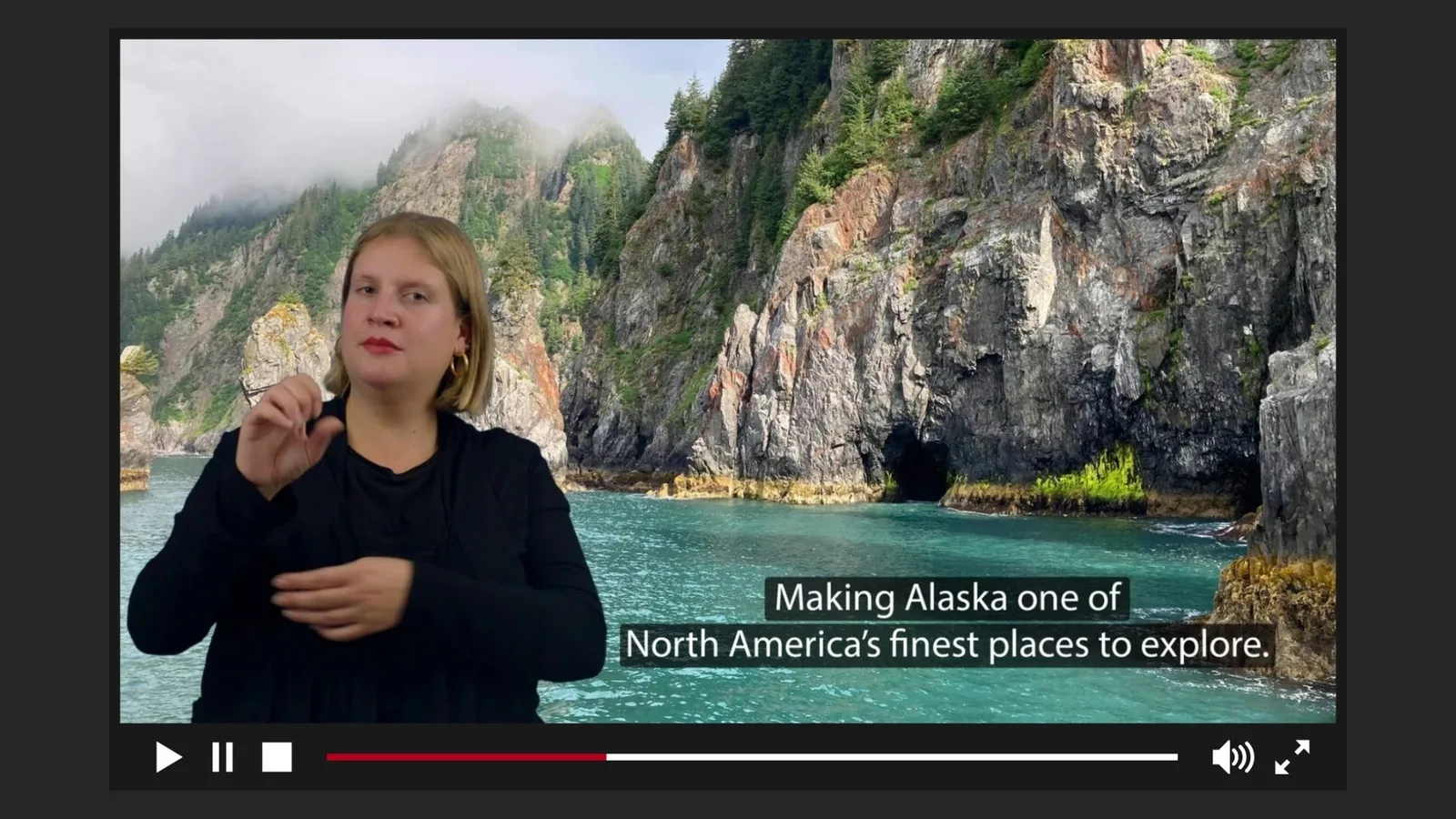
This accessibility feature is added to your prerecorded videos without altering the original message. A sign language interpreter is integrated using Picture-in-Picture (PIP), allowing viewers to watch your content simultaneously alongside the interpretation in their native language.

A GIF featuring a black and white animated cartoon character on the main screen, accompanied by an ASL interpreter in a picture-in-picture (PIP) inset window, signing the phrase, "Can add picture in picture PIP.
"Simultaneous" is the key word here, as it eliminates the need for viewers to experience the "tennis ball effect" - bouncing between multiple sources or screens to grasp the message. With PIP, your audience can soak in your content in a way that’s natural without missing a beat.

A black and white animated cartoon character experiencing various weather changes is shown in a GIF on the main screen, with an ASL interpreter featured in a picture-in-picture (PIP) inset window.
What sort of videos use PIP Sign Language Video Translation?
Adding sign language to video content is especially important when clarity, learning, and engagement matter most:
- Educational content: online courses, webinars, and e-learning modules
- Technical content: conferences, product demos, and specialized communities
- Organizational videos: employee training, onboarding, and internal communications
- Tours and experiences: audio guides, virtual tours, and museum content
- Podcasts and long-form content: video podcasts or recorded discussions benefit from added visual access
For organizations aiming to meet higher accessibility standards, PIP sign language video translation also supports alignment with WCAG (Web Content Accessibility Guidelines) Level AAA.
Answering Real Comments from Viewers New to Video Accessibility
At Inclusive Communication Services (ICS), we value transparent conversations with our clients and community. We recognize that accessibility is a worthwhile investment, but everyone’s background and experiences can shape their perspectives. Here are some common comments we have received, along with our responses.
Comment: “It’s too distracting.”
Response: Accessibility features may take some getting used to, especially if you’ve never faced the challenge of not understanding information in its mainstream format. Many people take this for granted daily. However, at ICS, viewers have reported that sign language interpreters help them stay more engaged with the presented content.
We also encourage viewers to flip the script: what if someone complained that the audio track was too distracting? Would the solution be to mute the video, leaving an entire audience alienated from the learning experience?
Comment: “The captions are enough.”
Response: While captions provide essential accessibility, they don’t fully capture the tone and expressions that text alone may miss. Try watching an entire episode of your favorite TV show on mute with subtitles turned on. You'll notice that professional captions include context clues, like [ominous music], suggesting something bad is about to happen, or [sarcastic tone], indicating that the written content shouldn't be taken literally.
It’s challenging to convey all elements of video and auditory communication with text alone. We appreciate captions and encourage you to always include them, use AI tools for initial generation and ensure a human edits them for the highest quality! It’s also crucial to recognize that American Sign Language (ASL) and English are distinct languages. Your viewers may be trying to understand your videos based solely on text in their second language.
Comment: “I don’t have any deaf or hard-of-hearing audiences.”
Response: Ever heard the saying, "Build it and they will come"? A deaf or hard-of-hearing person is likely to skip your content if it’s not accessible. Once again, flip the script, how likely are you to engage with a video that’s produced only in sign language? If you can’t understand it, why watch it?
The Next Generation of Deaf Students, Professionals, and Leaders
Think beyond your current audience. Accessible video content plays a key role in supporting future Deaf and hard-of-hearing students or professionals who will rely on clear, inclusive educational or training materials.
You’re opening doors for the next generation to learn, grow, and fully engage with the same information as their peers.